Web Development & Mac OS X
iCalendar Files on Mac OS X
Apple's new calendar application, iCal, is available for Mac OS 10.2. iCal makes it easy to publish and share your calendar data online, either through .Mac
or third-party services. Perhaps of more interest to developers, iCal
stores its data in the standard iCalendar (.ics) file format, which is
used by other calendar programs, like Mozilla Calendar.
This means you can take advantage of existing libraries to develop your
own applications for sharing and publishing iCal files.
In this article, I'll go over some options
for publishing your iCal data through outside services. I'll then show
you how you can start working with code that will let you display your
calendars on your own OS X server. I'll start with the basics of the
iCalendar file format, introduce you to some ways of dealing with iCal
files in Perl and PHP, and finally demonstrate a PHP-based WML calendar
viewer for cellular phones and other mobile devices.
Publishing Your iCal Data
The simplest way publish your iCal calendars is with .Mac.
Create a calendar, then choose "Publish" under the Calendar menu.
You'll be prompted to enter your .Mac user information into your
internet control panel if you haven't already done so. (Free trial
accounts are available from Apple, and permanent accounts are available
for a fee.) Once you've published a calendar, it will be available
online at http://ical.mac.com/.mac/username/calendarname. Other iCal users can subscribe to your calendar at webcal://ical.mac.com/username/calendarname.
Similarly, iCal Exchange
lets you publish your calendars to their server from within iCal. This
is currently a free service. To publish to iCal Exchange, select
"Publish" from the Calendar menu, and then select "Publish on a web
server." If you've published a general-interest calendar, you can use a
directory site like iCalShare to let people know that it exists.
Hosting Your Own Calendars
The rest of this article will focus on helping you publish your
calendar data on your own OS X server, either via a custom application,
or by installing a complete calendar viewer like PHP iCalendar. I'll
start with an overview of the .ics file format.
The iCalendar File Format
The full specification can for the iCalendar file format be found at the Internet Engineering Task Force site. Here's a simple example:
BEGIN:VCALENDAR
CALSCALE:GREGORIAN
X-WR-TIMEZONE;VALUE=TEXT:US/Pacific
METHOD:PUBLISH
PRODID:-//Apple Computer\, Inc//iCal 1.0//EN
X-WR-CALNAME;VALUE=TEXT:Example
VERSION:2.0
BEGIN:VEVENT
SEQUENCE:5
DTSTART;TZID=US/Pacific:20021028T140000
DTSTAMP:20021028T011706Z
SUMMARY:Coffee with Jason
UID:EC9439B1-FF65-11D6-9973-003065F99D04
DTEND;TZID=US/Pacific:20021028T150000
BEGIN:VALARM
TRIGGER;VALUE=DURATION:-P1D
ACTION:DISPLAY
DESCRIPTION:Event reminder
END:VALARM
END:VEVENT
END:VCALENDAR
Each line (called a "content line") consists of two parts, separated by a colon. The first part is called a property, and it can be combined with one or more parameters.
A property is separated from its parameters by a semicolon, and
multiple parameters can be separated by commas. The part after the
colon is called the property's value. For example, the DTSTART property above (the starting date and time of the event) has a parameter to indicate the relevant time zone, TZID, whose value is "US/Pacific": DTSTART;TZID=US/Pacific.
The property's value is a date/time string which consists of the date
in YYYYMMDD format, followed by the letter "T," and a time string in
HHMMSS format.
Note that lines end Windows-style, with a
carriage return and line feed (CRLF). You can "fold" long lines by
inserting a CRLF followed by one or more whitespace characters.
Calendars can contain various components, such as events, alarms, to-do
list items, and others. The most common component is an event. You can
see an event described above between the lines BEGIN:VEVENT and END:VEVENT. Event times can be indicated by the DTSTART and DTEND properties, or by combinations of the DTSTART, DURATION, and RRULE properties.
The RRULE property defines recurrence rules for a given object, and the syntax can get fairly complicated. RRULEs
allow an iCalendar file to efficiently contain an event that
indefinitely repeats, say, the second Tuesday of each month, but
doesn't happen in November and June. Here's an example RRULE for a recurring Monday-to-Thursday event that lasts until December 14, 2002:
RRULE:FREQ=WEEKLY;UNTIL=20021214T055959;INTERVAL=1;BYDAY=MO,TU,WE,TH
Parsing with Perl
Developers in the Reefknot Project have made inroads toward a Perl toolkit for parsing iCal files. The two major modules under development are Net::ICal and Date::ICal. Net::ICal,
which aims to be a more comprehensive iCalendar parser, is in a very
early alpha release, and unfortunately does not seem to be under active
development—so it's not even ready for lightweight use. There is a mailing list for developers and potential developers, however, and the module authors have put out a call for support.
Date::ICal, a smaller module for
parsing iCalendar-style dates, is more stable. It could be useful if
you'd like to write your own parser in Perl. To install Date::ICal from CPAN, simply type the command below in a Terminal window, then follow the onscreen prompts:
sudo perl -MCPAN -e 'install Date::ICal'
<followed by your password>
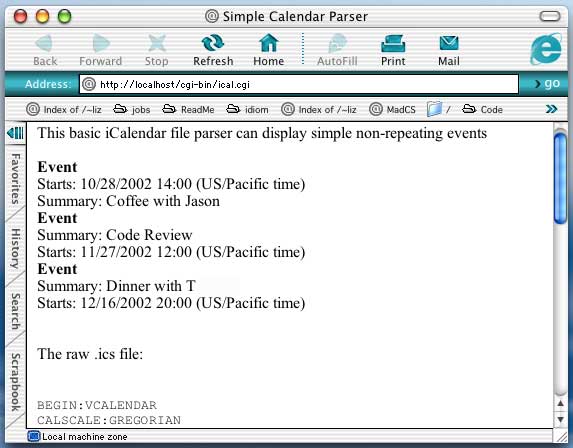
The sample Perl/CGI script below is capable of parsing simple
(non-repeating) events and displaying them as a flat list. It uses Date::ICal to handle date/time strings. Since only a few key properties are recognized, most content lines end up being silently ignored:
#!/usr/bin/perl

use Date::ICal;
use strict;
use CGI;
use CGI::Carp qw(fatalsToBrowser);

my $c = new CGI();

print $c->header();
print $c->start_html('Simple Calendar Parser');
print "This basic iCalendar file parser can display simple non-repeating events<br><br>";

#### either install example.ics in your cgi-bin directory, or provide a full path below
open(FILE,'example.ics') or die "Cannot open sample .ics file 'example.ics'";

my $showfile = '';
while(<FILE>)
{
    $showfile .= $_;
    chomp();
    my ($prop,$val) = split(':',$_);
    dispatch($prop,$val);
}

print "<br><br>The raw .ics file:<br><br><pre>$showfile</pre><br>";

print $c->end_html();

## handle the DTSTART property
sub dtstart
{
    my ($dtstring,@pp) = @_;
    my $tzone = '';
    # check the parameter list for a time zone (we're just going to display it)
    for my $p (@pp)
    {
       if ($p =~ s/TZID=(.*)/$1/i)
       {
           $tzone = " ($p time)";
           last;
       }
    }
    return "Starts: " . pretty_dt($dtstring) . "$tzone";
}

## handle the BEGIN property (only recognize VEVENTs)
sub begin
{
    my ($d,@pp) = @_;
    # only deal with VEVENT
    my $ret = $d eq 'VEVENT' ? "<strong>Event</strong>" : undef;
    return $ret;
}

## handle the SUMMARY property
sub summary
{
    my $s = shift;
    return "Summary: $s";
}


sub dispatch
{
    # set up a hash of references to functions to call for a few selected properties
    # anything else will be ignored

    my %funcs = ( 'BEGIN' => \&begin ,
                'SUMMARY' => \&summary ,
                'DTSTART' => \&dtstart );

    my ($prop_params,$data) = @_;
    # properties can be followed by optional parameters, separated by a semicolon

    my @prop_params = split(';',$prop_params);

    if ( $funcs{$prop_params[0]} )
    {
        my $output = &{ $funcs{$prop_params[0]} }($data,@prop_params);
        print "$output <br>\n" if $output;
    }
}

## use Date::ICal to parse a date-time string
sub pretty_dt
{

    my $dstring = shift;

    my $ical = Date::ICal->new( ical => $dstring );

    $ical->offset(0); # no time zone math (we're displaying the timezone, if supplied)

    my $pdate = my $day = $ical->month . '/' . $ical->day . '/' . $ical->year;

    $pdate .= ' ' . $ical->hour . ':' . ($ical->min > 10 ? $ical->min : '0' . $ical->min);

    return $pdate;
}
If you've installed the Perl script above, you can run it against a small example .ics file, like this one. If you do, you'll see the following output:
Parsing with PHP
While the iCalendar libraries available for Perl are currently
incomplete at best, there's at least one solid tool available for PHP. PHP iCalendar
is an open-source iCal file parser that generates a number of
attractive, customizable calendar views. A sample calendar can be found
here.
To install PHP iCalendar, first make sure your version of Apache is configured to support PHP. If it isn't, please see this article
for instructions. You should note that PHP iCalendar assumes that
request variables will be available as globals, and will alter your php.ini file to enable gpc_globals, if necessary.
At the time of this writing, the most current version of PHP iCalendar is 0.8.1, available for download here.
Here are the steps I took to download and extract the files into my
server's document root directory. Note that you may wish to download
from a different mirror.
liz> cd /Library/WebServer/Documents
liz> curl -O http://telia.dl.sourceforge.net/sourceforge/phpicalendar/phpicalendar-0.8.1.tgz
liz> tar -xzvf phpicalendar-0.8.1.tgz
That's it. Because the code comes with sample calendars, you can now test your installation by going to http://localhost/phpicalendar-0.8.1/index.php.
Using the default code to display your own calendars is as easy as
copying your .ics files to the "calendars" directory of your PHP
iCalendar installation. If you'd like your online calendars to be
updated as soon as you change them with iCal, you can create symbolic
links from your iCal files to your web calendar directory. For this to
work, you'll need to make your ~/Library directory world-executable
before you make the symbolic link:
liz@mail> chmod go+x ~/Library
liz@mail:~> cd /Library/WebServer/Documents/phpicalendar-0.8.1/calendars
liz@mail:calendars> ln -s ~/Library/Calendars/Home.ics ./Home.ics
Another option is to use a cron job to copy
calendars from ~/Library/Calendars to
/Library/WebServer/Documents/phpicalendar-0.8.1/calendars on a regular
basis. To use the cron scheduler to copy calendars to a web directory
nightly, add these four lines to your crontab file.
# use /bin/sh to run commands, no matter what /etc/passwd says
SHELL=/bin/sh
# run five minutes after midnight, every day
5 0 * * *  cp /Users/liz/Library/Calendars/*.ics /Library/WebServer/Documents/phpicalendar-0.8.1/calendars > /dev/null 2>&1
For a short tutorial on using cron with OS X, see this article at macosxhints.
Extending PHP iCalendar: A WML Calendar
Although PHP iCalendar works just fine as a
stand-alone application, it also provides a number of utility functions
that you can use to extend its functionality or write your own iCal
viewer. For example, you can build an application that uses the PHP
iCalendar internals to simplify the process of creating a WML calendar
viewer for cell phones and other wireless devices.
To use this application, first add a few lines to your httpd.conf file (in OS X, this file usually lives in /etc/httpd/):
  AddType text/vnd.wap.wml .wml
  Addhandler application/x-httpd-php .wml
The first line adds a new MIME type for .wml files. The second tells Apache to parse .wml files as PHP.
If you're new to WML, you might want to vist a WML tutorial like this one
at W3Schools. In general, WML is very similar to HTML but with a
smaller set of tags. WML files must be made up of valid XML, and can be
arranged into "cards," which can then be linked to one another.
Although the files below are separated into one card per file, you can
combine two or more cards in a single WML file.
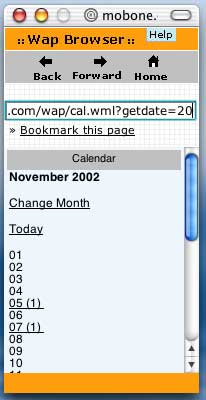
The first of the three files in this application is named cal.wml,
and it shows a month-at-a-time view of the calendar. A day will appear
hyperlinked if it has any events, and the user can then select the link
to view that day's calendar. Since cell phone screens are tiny, the
output is as minimal as possible:
<?php

header ("Content-type: text/vnd.wap.wml");
// set this to the location of phpicalendar on your system
define('BASE', './phpicalendar-0.8.1/');

// the phpicalendar files assume that request variables will be
// available as globals. you may need to edit your php.ini file to enable
// gpc_globals

include_once(BASE.'functions/ical_parser.php');

// set up some date variables

ereg ("([0-9]{4})([0-9]{2})([0-9]{2})", $getdate, $day_array);
$this_day = $day_array[3];
$this_month = $day_array[2];
$this_year = $day_array[1];

$date = mktime(0,0,0,"$this_month","$this_day","$this_year");

$long_month = date("F", $date);
$iday = strtotime($this_year.$this_month."01");

$i = 1;
$lastday = date('j', mktime(0,0,0,$mon+1,0,$year));

$today = date( "Ymd", time() );

// start the xml page

print '<?xml version="1.0"?>
<!DOCTYPE wml PUBLIC "-//WAPFORUM//DTD WML 1.1//EN"
"http://www.wapforum.org/DTD/wml_1.1.xml">
<wml>';


?>

<card id="main" title="Calendar">
<p>
<strong><?= $long_month ?> <?= $this_year ?></strong>
</p>
<p>
<a href="newmonth.wml?getdate=<?= $getdate ?>">Change Month</a>
</p>
<p>
<a href="day.wml?getdate=<?= $today ?>">Today</a>
</p>
<p>

<?php

// loop through the days in the month, display with
// a link if there are any events in the calendar

while ($i < $lastday)
{
    $day = date ('d', $iday);
    $daylink = date ("Ymd", $iday);
    $pday = $i < 10 ? "0$i" : $i;
    $tstar = strcmp("$this_year$this_month$pday",$today) ? '' : '*';

    if (isset($master_array[("$daylink")]))
    {
        print "<a href=\"day.wml?getdate=$this_year$this_month$pday\">$day";
        $ecount = count($master_array[("$daylink")]);
        print " ($ecount)  $tstar</a>";
    }
    else
    {
        print "$day $tstar";
    }
    print '<br/>';
    $iday = strtotime("+1 day", $iday);
    $i++;
}

?>

</p>
</card>

</wml>
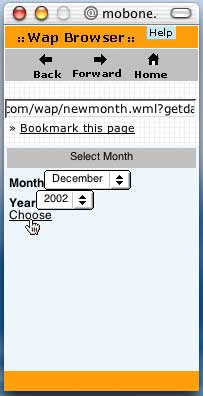
Next is a card called newmonth.wml
which allows the user to switch months. If you're unfamilar with WML,
you'll notice that the form elements are similar to HTML form elements,
although the code to define the form's action is different:
<?php

header ("Content-type: text/vnd.wap.wml");
print '<?xml version="1.0"?>
<!DOCTYPE wml PUBLIC "-//WAPFORUM//DTD WML 1.1//EN"
"http://www.wapforum.org/DTD/wml_1.1.xml">
<wml>';

?>
<card id="mlist" title="Select Month">
<p>
<strong>Month</strong>
<select name="m">
<option value="01">January</option>
<option value="02">February</option>
<option value="03">March</option>
<option value="04">April</option>
<option value="05">May</option>
<option value="06">June</option>
<option value="07">July</option>
<option value="08">August</option>
<option value="09">September</option>
<option value="10">October</option>
<option value="11">November</option>
<option value="12">December</option>
</select>

<strong>Year</strong>
<select name="y">
<option value="2002">2002</option>
<option value="2003">2003</option>
</select>
<do type="accept" label="Choose"><go href="cal.wml?getdate=$(y)$(m)01"/></do>

</p>

</card>

</wml>
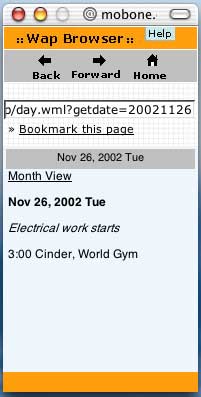
Finally, here's a card that displays a one-day view of calendar events. The other files in this set assume it will be named day.wml:
<?php

header ("Content-type: text/vnd.wap.wml");
print '<?xml version="1.0"?>
<!DOCTYPE wml PUBLIC "-//WAPFORUM//DTD WML 1.1//EN"
"http://www.wapforum.org/DTD/wml_1.1.xml">
<wml>';
// set this to the location of phpicalendar on your system
define('BASE', '/usr/local/apache/htdocs/wap/phpicalendar-0.8.1/');

// the phpicalendar files assume that request variables will be
// available as globals. you may need to edit your php.ini file to enable
// gpc_globals

include_once(BASE.'functions/ical_parser.php');

ereg ("([0-9]{4})([0-9]{2})([0-9]{2})", $getdate, $day_array);
$this_day = $day_array[3];
$this_month = $day_array[2];
$this_year = $day_array[1];

$date = mktime(0,0,0,"$this_month","$this_day","$this_year");

$showday = date('M j, Y  D', $date);

?>

<card id="day" title="<?= $showday ?>">
<p><a href="cal.wml?getdate=<?= $getdate ?>">Month View</a></p>

<?php
    print "<p><strong>$showday</strong></p>";

    $daylink = date ("Ymd", $date);

    if (isset($master_array[("$daylink")]))
    {
        foreach ($master_array[("$daylink")] as $event_times)
        {
            foreach ($event_times as $val)
            {
                $num_of_events++;
                $event_text = stripslashes(urldecode($val["event_text"]));
                $event_text = strip_tags($event_text, '<b><i><u>');
                $event_text = htmlentities($event_text,ENT_NOQUOTES);
                if ($event_text != "")
                {
                    $event_start = @$val["event_start"];
                    $event_end = @$val["event_end"];
                    $event_start = date ($timeFormat, @strtotime ("$event_start"));
                    $event_start2 = date ($timeFormat_small, @strtotime ("$event_start"));
                    $event_end = date ($timeFormat, @strtotime ("$event_end"));
                    if (!isset($val["event_start"]))
                    {
                        $event_start = '';
                        $event_end = '';
                        print "<p><i>$event_text</i></p>";
                    } else
                    {
                        print "<p>$event_start2 $event_text</p>";
                    }
                }
            }
        }
    } else
    {
        print "<p>No Events Scheduled</p>";
    }

?>
</card>
</wml>
This application was written to display a
single calendar. If you want to display a calendar of your own, simply
place it (or create a symbolic link to it, as shown above) in the calendars directory of your PHP iCalendar installation. Then edit config.inc.php and change the value of $default_cal. You can also acheive the same result by moving or deleting all files in the calendars
directory except for yours. If PHP iCalendar sees a single .ics file in
that directory, it will automatically use that file as the default.
To test these files, you can use a web-enabled cell phone or a WAP browser simulator like the one available from mobone.com.
If you've got everything configured correctly, you'll see something
like the screenshots below. (Note that the mobone.com browser simulates
a WAP browser by means of a CGI script, which means that your web
server must be visible to other machines on the internet.)
Month View (cal.wml)
Day View (day.wml)
Choose a New Month (newmonth.wml)
Conclusion
The tools available for parsing iCal files are
still young, as is the iCal application itself. Still, I hope I've
shown you some promising methods for exploring online shared calendars.
If your interest has been sparked by this topic, I encourage you to
look into contributing to one of the several worthy open-source
development efforts currently underway.